
EN
Business profile, opening hours, and legal information
The Business profile is the source of the information shown in the directory, widgets, and other public interfaces. Complete it before sharing customer links.
Prerequisites
- You have access to the business profile and the correct organisation and contact information.
- You have images and legal texts that the business has the right to publish.
What you will learn
- how to complete the profile, opening hours, tags, and gallery
- how legal documents and privacy settings work together
- what to check before sharing public links
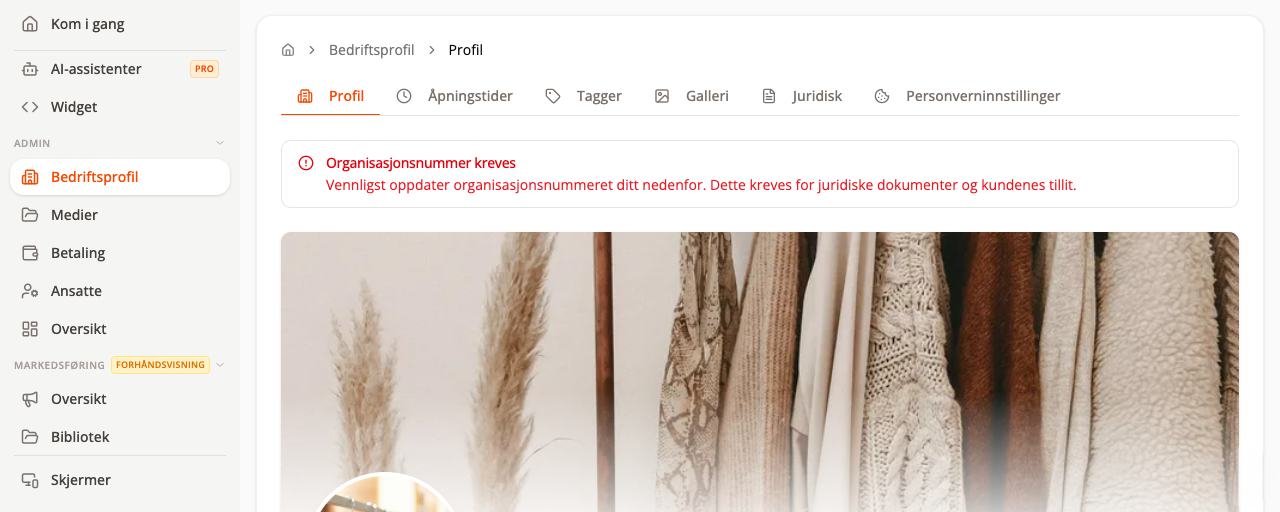
1. Complete the Profile
Go to Admin → Business profile → Profile.
Check at least:
- business name and short description
- organisation number
- phone number, email address, and address
- industry and relevant categories
- logo and cover image
- public username/link, if the field is available
A red message at the top explains what is missing. An organisation number is usually required for legal documents and customer trust.
2. Set opening hours
Open the Opening hours tab.
- Enable the days when the business is open.
- Enter the opening and closing time for each day.
- Use separate periods if you close for a break during the day.
- Save and check that the hours appear correctly on the public page.
Booking-based businesses must also check Booking → Schedule. Opening hours and booking hours serve different needs and should not contradict each other.
3. Add tags and a gallery
Tags help customers understand the offering and may be used in search. The Gallery shows images of the premises, services, or products.
Use your own images that you have the right to publish. Avoid images containing customer data, order confirmations, or people who have not consented.
4. Publish legal documents
Open the Legal tab and check:
- terms of sale
- privacy policy
- any cancellation and refund terms
- contact information and organisation number
The text must reflect how the business actually accepts payments, delivers, and handles cancellations. Finta.no may provide templates, but the business is responsible for the content.
5. Check privacy settings
Under Privacy settings, choose how consent and cookies are handled. Only enable marketing for which the business has a valid legal basis.
Before you continue
- Open the public profile in a private browser window.
- Test the links to the legal documents.
- Check the mobile view and contact information.
- Ask someone else to review the prices, hours, and terms.
Next step
Add Services, products, and pricing rules, then complete Widgets and going live.